Meet Coord2Region
From raw neuroimaging coordinates to atlas‑level labels, study retrieval, AI summaries, and reproducible outputs. Build a configuration in the browser, then run it locally with the CLI — or start in the CLI and import the YAML here to keep everything in sync.
➡️ Open the Config Builder: [/Coord2Region/builder/](/Coord2Region/builder/)
What you can do
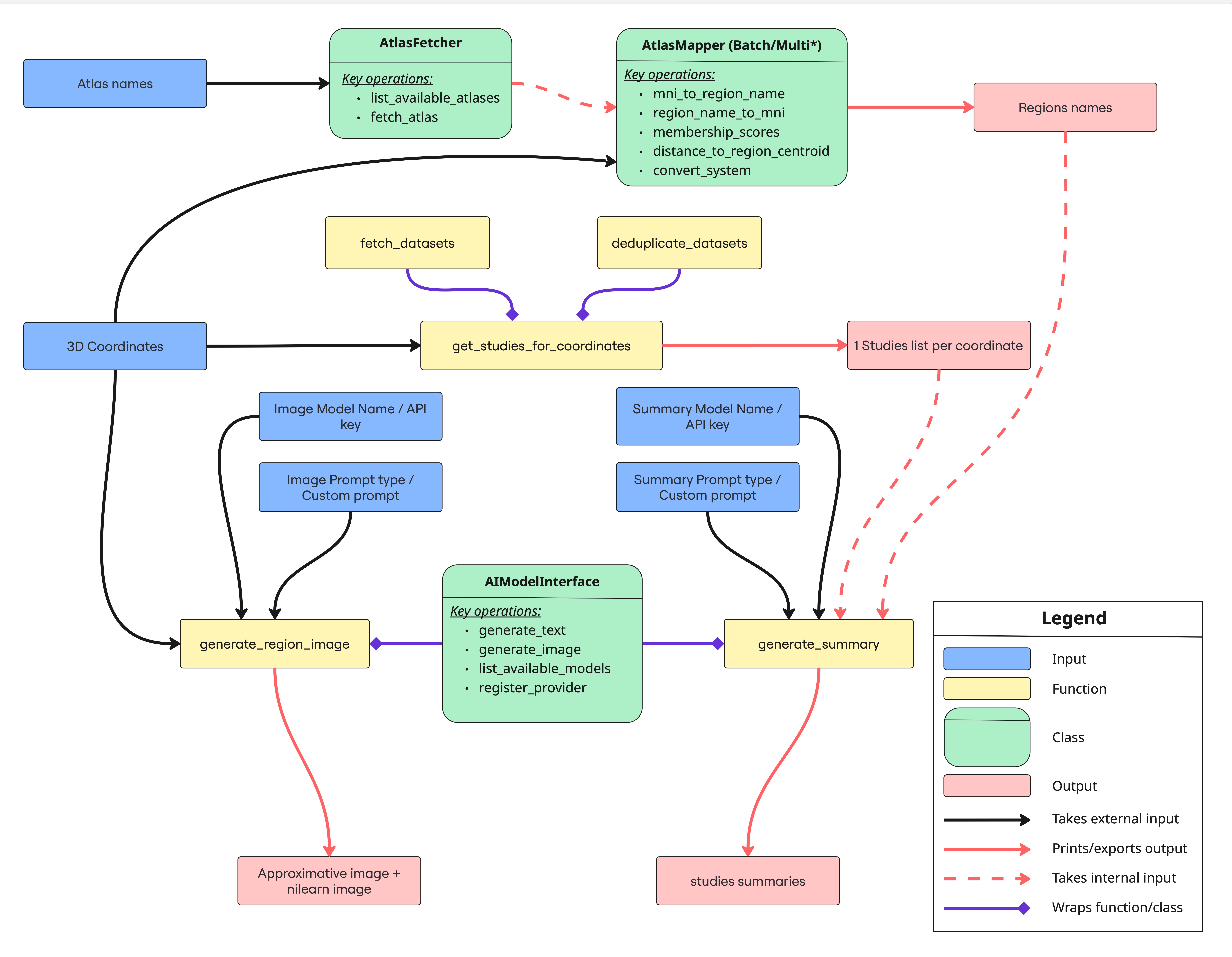
- Map coordinates to atlas regions and summaries
- Query related studies and generate YAML configs
- Export CLI commands for quick runs
- Optionally include AI‑generated images and nilearn anatomical slices
Getting started
- Install the Python package (
pip install coord2region) and runpython scripts/configure_coord2region.pyonce to capture API keys and atlas cache paths. - Launch the builder from this site, choose coordinates or region names, and fill out the guided form.
- Copy the YAML or CLI command into your terminal – or download the YAML and import it later to continue editing.
Quick links
[About](/Coord2Region/about/) · [Config Builder](/Coord2Region/builder/) · [Cloud Runner](/Coord2Region/cloud/) · Docs · GitHub
How it works
- Load coordinates or select atlas regions in the Builder.
- Choose providers and output options.
- Copy the generated YAML or CLI, then run locally.
Want details? See [About](/Coord2Region/about/) or the Docs.